
I work as a software engineer, homeschool my children, and run The Lunara Edit, where I create learning resources and write about working, learning, and living at home. Building the website brings those parts of my life into the same project. I get to think about the words and images someone sees, then follow a reader’s action through the code that makes it work.
If you enjoy the behind-the-scenes details of a small business, this is a look at mine. I’ll explain the pieces in everyday language first, with a closer look at the implementation for anyone who enjoys knowing what happens after a button is clicked.
Building a home for the work
The Lunara Edit includes articles, printable resources, and curriculum. That variety makes the website an interesting design problem: someone browsing an article and someone looking for a resource to use with their children need different things from the same site.
The visible work includes readable pages, clear navigation, and a visual style that fits Lunara. Beneath that are decisions about how the content is organized, how pages behave on a phone, and what should happen when someone interacts with them. Even a small feature can involve several pieces working together.
The tools behind the pages
The site uses Next.js, React, and TypeScript. React helps build the interface from reusable pieces, Next.js provides the framework for the pages and server-side features, and TypeScript helps catch certain kinds of mistakes while I’m developing. Vercel hosts the website.
Neon provides the Postgres database and authentication used by the article-discussion system. A database gives the application somewhere to keep information between visits. For this feature, that includes comments, replies, whether a comment has been approved, and which comments a browser has hearted.
The article content itself is maintained in the website’s codebase; Neon’s role here is the information generated by reader interaction. That distinction helps explain why adding a database changes what a website can do.
Buying a printable through Polar


The shop introduces another reader journey. Someone can browse a resource’s description, contents, and previews on Lunara, then choose Buy the PDF. That button opens a reusable link to Polar’s hosted checkout for the selected product.
The paid PDFs are attached to their products in Polar as File Downloads benefits. After payment, buyers can access those files and their receipts through Polar’s customer portal, using the email address from their purchase. This gives the website a buying and delivery path while Polar handles the checkout and purchased-file access.
There is a practical check behind the purchase buttons, too. The site only offers its Polar checkout when the store is approved, the link and price are valid, and the product’s downloads are marked ready in the site configuration. That readiness flag follows a file review; it is not a live check of Polar’s attachments on every visit. The point is to keep an unfinished product setup from becoming a working purchase button before its promised files are attached.
Polar and Neon have separate jobs in this build. Purchase records and paid-file access stay with Polar; Neon stores the reader discussions. The current integration does not copy Polar orders into Neon.
Following a comment through the system
The discussion feature lets readers leave a comment or a one-level reply without creating an account. Each article has discussion prompts, and a reader can respond to those or bring up a related thought. As of October 12, 2026, the public form and comment-reading API are available; that read-only check is separate from testing a submission, owner sign-in, or email delivery.
When someone submits a comment, the browser sends it to the website’s server. The server checks the submission and stores it in Neon with a pending status. It stays in the moderation queue until I approve it. The public reading path only returns approved comments and approved replies whose parent comments are also approved.
Once a valid reader comment has been stored, the application schedules an email alert through Sender, with a link to the moderation dashboard. If the email fails, the comment still exists in the queue. That order matters: a notification problem should not make someone’s contribution disappear.
Hearts use a browser-specific identifier, so the same browser can remember which comments it has hearted. Clearing browser data or switching devices changes that experience; there is no reader account connecting those visits.
BEHIND THE PAGES
Website architecture
GitHub holds the code and article content. Vercel runs the Next.js website and its server routes.
Scroll sideways on smaller screens, or open the larger view to zoom.
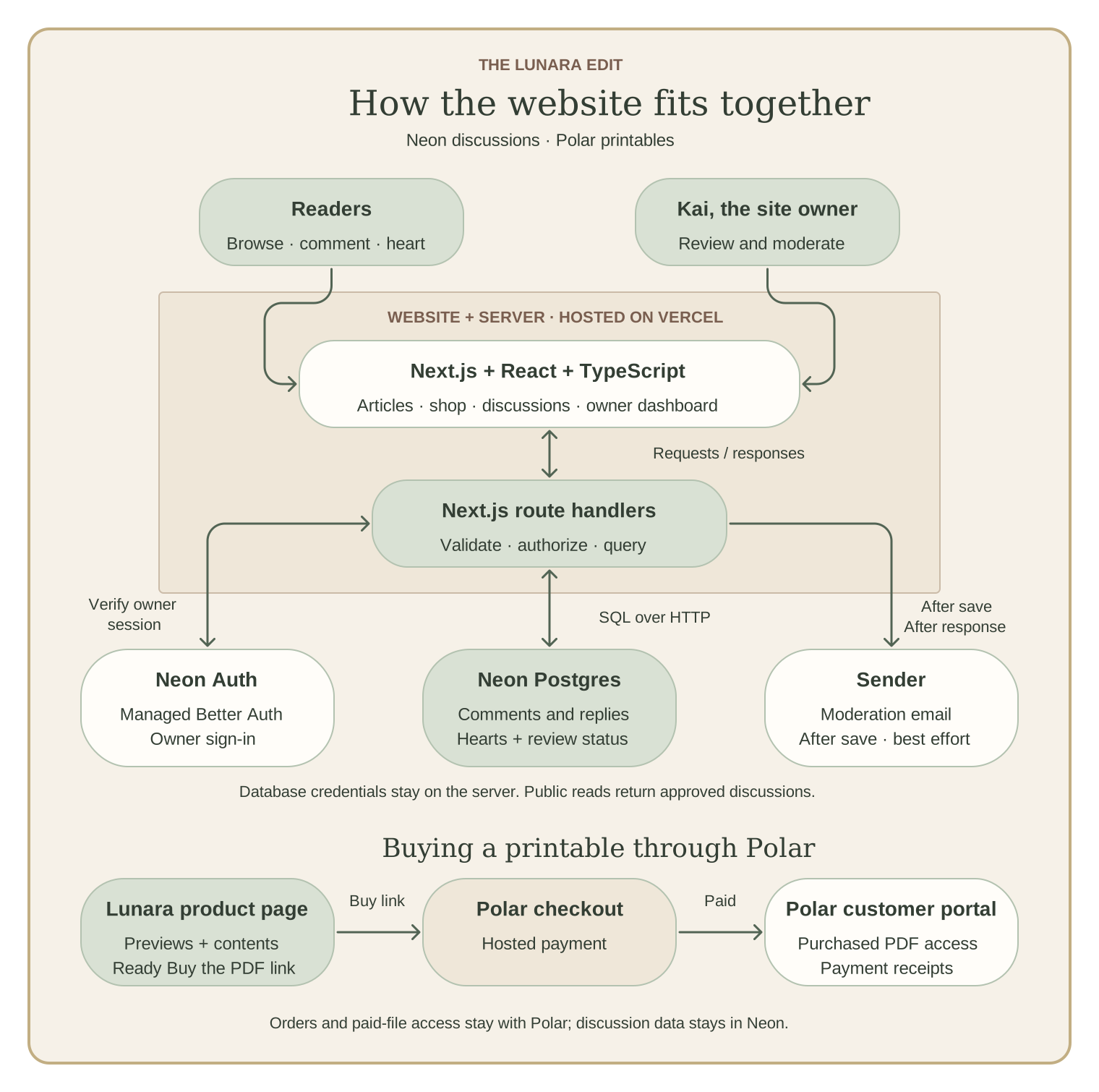
Read the connections in the diagram
Readers and the owner use the Next.js website. Its server routes validate requests, verify the owner’s identity through Neon Auth, and send parameterized SQL over HTTP to Neon Postgres. New comments wait for review; public reads return approved comments and replies whose parents are approved.
After a comment is saved, Next.js schedules a Sender moderation alert. Delivery is best effort; a failed email leaves the comment in the moderation queue.
A product page’s ready Buy the PDF link opens Polar’s hosted checkout. Polar handles payment, purchased File Downloads benefits, and receipts. Orders and paid-file access stay with Polar.
Before browsing, reviewed captures from Polar, curriculum records, and Notion pass through a validator into the public catalog snapshot. Page requests read that snapshot.
For the technically curious
The browser calls Next.js route handlers. Those handlers use @neondatabase/serverless to query Postgres over HTTP, with parameterized SQL. Database credentials remain server-side. The code separates the public article-conversation API from the owner’s moderation API.
Moderator sign-in uses Neon Auth, built on Better Auth. A valid session is only part of the permission check: the application requires a verified email matching the configured owner and, when configured, a matching pinned user ID. In engineering terms, authentication establishes identity, while authorization determines what that identity may do. Signing in does not automatically grant moderation access.
The public query also enforces discussion visibility. If a top-level comment is hidden, its replies disappear from the public results. Handling that rule in the query keeps it consistent, instead of depending on the interface to hide records after receiving them.
The browser does not connect to Postgres directly or receive database credentials. Although row-level security is enabled on the discussion tables, the current server connection uses the table owner, which bypasses those policies. Reader and moderator access therefore depends on the server’s authorization checks and SQL rules. A future least-privilege database role would need its own grants and policies.
Notification delivery is currently best effort. The comment is saved first, and Next.js after() schedules the alert after the response, within the platform’s execution limit. The implementation has no durable notification queue or automatic retry job. A future improvement could be a transactional outbox: save a notification job in the same database transaction as the comment, then have a worker retry delivery. The worker would also need duplicate-delivery handling; an outbox alone does not guarantee that an email reaches an inbox.
The Polar connection uses ordinary hosted checkout links. The catalog layer validates reviewed captures from Polar, maintained curriculum records, and Notion, then produces an allowlisted public snapshot for the website. The refresh script does not make a live Polar API call, and each page request reads the checked-in snapshot. Checkout links, displayed prices, and download-readiness controls remain in the site’s existing commerce modules, so relevant changes still need a reviewed site update. Purchase links can work without JavaScript. Optional analytics record a Checkout click, which is distinct from a paid order: completed purchases must be checked in Polar.
Testing changes away from the production database
The discussion migration was tested on a separate Neon development branch before being applied to production. A database branch provides an isolated place to work: changes there do not change the parent branch. It lets me check the actual database behavior while keeping development work separate from the production data.
For this feature, the checks included inserting synthetic comments, exercising the API, and verifying moderation-related behavior. The integration scripts refuse to run without the expected development branch-name setting, but that setting is a configuration guard rather than proof of where a database URL connects. The connection still needs to be checked against the intended Neon branch before running a test that writes data.
Making the product information consistent
I’ve already recorded practical details about the resources in Polar: the work involved, where an adult may need to help, what to prepare, and how much time to allow. Parents need that information when they’re deciding whether a study fits their child and their week.
The latest catalog work is merged into the website’s codebase. It brings the thirteen mapped products into one validated set of planning information while preserving qualifications and separating preparation, adult support, and learner time. When records disagree about something such as an age range or page count, the unresolved field stays unavailable for confident matching. That leaves me a specific review task instead of quietly choosing whichever value arrived last.
The next interface I want to build is a guide that helps a parent use those details. The shared data layer is in place; the parent-friendly finder and connected topic pages are still planned work.
Checking the reader experience
The browser suite now exercises fourteen scenarios in desktop and mobile Chromium, for twenty-eight checks in total. It covers shop filters, worksheet previews, publication rules, analytics consent, comment and moderation interface behavior, and this article’s diagram readability and cover proportions. One regression check confirms that a product with conflicting age guidance remains available to browse while staying out of confident age-filter matches.
Those browser checks use an isolated build with synthetic or intercepted service responses. They test the interface without sending real email or taking a payment. Live sign-in, email delivery, database persistence, and purchased-file access need their own integration checks. Keeping that boundary explicit helps me understand what a passing test actually establishes.
Continuing the build
The website gives me an ongoing place to work on both publishing and software. As Lunara grows, I can see where navigation needs more care, which interactions are useful, and which ideas deserve the time they would take to build.
Comments and printable purchases give me two useful examples of that work. Both start with a familiar action on the page, then depend on choices about storage, permissions, delivery, and what happens when something fails. Those are the details I enjoy getting to show alongside the finished website.
- Current application dependencies (opens in a new tab) and Neon setup (opens in a new tab) (project repository; access may require sign-in).
- Discussion architecture, moderation, notification design, testing, and recorded rollout status (opens in a new tab).
- Actual server-side discussion queries (opens in a new tab).
- Shop setup and Polar integration (opens in a new tab), checkout validation and readiness checks (opens in a new tab), and product purchase links (opens in a new tab).
- Polar documentation: File Downloads benefits (opens in a new tab) and customer portal (opens in a new tab).
- Neon’s serverless driver (opens in a new tab) · Neon Auth and Better Auth (opens in a new tab) · Database branching (opens in a new tab).
- Next.js after() and its execution limit (opens in a new tab) · PostgreSQL row security and table-owner behavior (opens in a new tab).
- Current catalog interface and reconciliation: shared catalog documentation (opens in a new tab). Browser coverage and its service boundaries: browser test runbook (opens in a new tab) and passing CI run (opens in a new tab).
- Neon offered me $50 in account credits by email for sharing the project and replying with the published link.